LearnJDE is a official Oracle platform about JD Edwards resources.
Few days ago, the web has been renewed with more resources, UX, skinning and structure.
Probably it's the best platform and the most updated to learn JD Edwards, contains +1000 Documentation, +400 videos and tutorials, white papers, Digital Transformations (Mobile, IoT, UX One, JDE Cloud, etc).
You can see here: http://docs.oracle.com/cd/E84502_01/learnjde/home.html
Let's go!
viernes, 28 de abril de 2017

viernes, 23 de diciembre de 2016
[JD Edwards] Tools 9.2.1 - Forms Personalitation
In new JD Edwards 9.2.1 tools, a new feature is Personal Forms. This feature allow customize forms to end user, as they could customize grid. It allow show or hide fields, move fields, resize fields,... on runtime. In the next video you can watch posibilites:
It's very powerfull tool, this will allow to developers and users be more productive.
Enable feature in system:
To enable this feature you have to activate it in UDO's, you can see this official document.
Go to Security Workbench P00950 -> Form -> Feature Security, find "PERSFORM" and enable access:
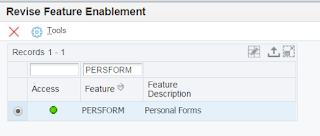
Later you go to UDO's page and enable for users:
In P00950 -> Form -> User Defined Object -> Action. Click in Add: Fill fields
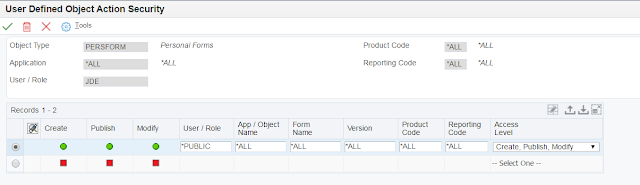
You need clear the jdbj security cache in Server Manager and reset session to see this feature enabled.
Works with Personal Forms:
In any form, you can see Personal Form icon on top right:
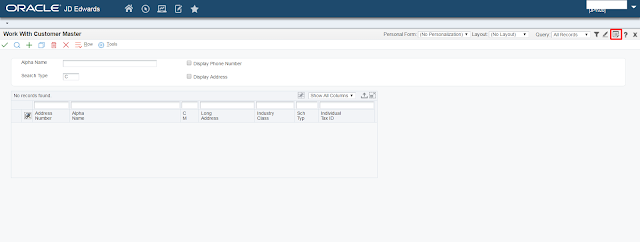
Click and you can start to personalize your form:
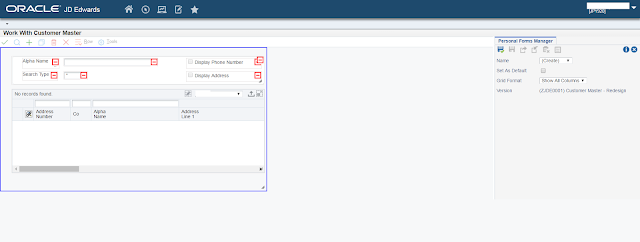
If you click on less icon, the field hided and it'll appear in right panel for if you want show later. you can move fields, resize, change labels, etc.
For more information you can access this official document.
It's very powerfull tool, this will allow to developers and users be more productive.
Enable feature in system:
To enable this feature you have to activate it in UDO's, you can see this official document.
Go to Security Workbench P00950 -> Form -> Feature Security, find "PERSFORM" and enable access:

Later you go to UDO's page and enable for users:
In P00950 -> Form -> User Defined Object -> Action. Click in Add: Fill fields

Works with Personal Forms:
In any form, you can see Personal Form icon on top right:

Click and you can start to personalize your form:

If you click on less icon, the field hided and it'll appear in right panel for if you want show later. you can move fields, resize, change labels, etc.
For more information you can access this official document.
miércoles, 12 de octubre de 2016
[Javascript] Función filter
Hola amigos,
Después de probar el ejemplo de filtro Javascript de nuestros amigos DevCode he decidio optimizarlo con la función filter javascript para arreglos o arrays.
La sintaxis es:
array.filter(function(element){return condicion_cumplir_elemento});
Ejemplo:
index.html
<!DOCTYPE html>
<html lang="es">
<head>
<title>Buscador Javascript</title>
<meta charset="utf-8"/>
<script type="text/javascript" src="source.js"></script>
</head>
<body>
<input type="text" id="buscar-pal" onkeyup="autocompletado2()" style="border: solid 2px" />
<div>
<ul id="demo"></ul>
</div>
</body>
</html>
source.js
function autocompletado2(){
document.getElementById("demo").innerHTML='';
var preguntas = [
"BASIC",
"C",
"C++",
"Java",
"Javascript",
"PHP",
"Python",
"Ruby"
];
var pal = document.getElementById("buscar-pal").value;
var tam = pal.length;
if(tam>0){
var filtrados = preguntas.filter(function(nombre){
var nombrelower = nombre.toLowerCase();
return nombrelower.indexOf(pal.toLowerCase()) != -1;
}
);
for(indice in filtrados){
var node = document.createElement("li");
var textnode = document.createTextNode(filtrados[indice]);
node.appendChild(textnode);
document.getElementById("demo").appendChild(node);
}
}
}
El resultado:

Después de probar el ejemplo de filtro Javascript de nuestros amigos DevCode he decidio optimizarlo con la función filter javascript para arreglos o arrays.
La sintaxis es:
array.filter(function(element){return condicion_cumplir_elemento});
Ejemplo:
index.html
<!DOCTYPE html>
<html lang="es">
<head>
<title>Buscador Javascript</title>
<meta charset="utf-8"/>
<script type="text/javascript" src="source.js"></script>
</head>
<body>
<input type="text" id="buscar-pal" onkeyup="autocompletado2()" style="border: solid 2px" />
<div>
<ul id="demo"></ul>
</div>
</body>
</html>
source.js
function autocompletado2(){
document.getElementById("demo").innerHTML='';
var preguntas = [
"BASIC",
"C",
"C++",
"Java",
"Javascript",
"PHP",
"Python",
"Ruby"
];
var pal = document.getElementById("buscar-pal").value;
var tam = pal.length;
if(tam>0){
var filtrados = preguntas.filter(function(nombre){
var nombrelower = nombre.toLowerCase();
return nombrelower.indexOf(pal.toLowerCase()) != -1;
}
);
for(indice in filtrados){
var node = document.createElement("li");
var textnode = document.createTextNode(filtrados[indice]);
node.appendChild(textnode);
document.getElementById("demo").appendChild(node);
}
}
}
El resultado:
[Javascript] filter Function
Hi friends,
After testing Javascript filter sample of our friend DevCode () I've decided to optimize with javascript filter function for arrays.
The syntax it's:
array.filter(function(element){return condition_for_element});
Example:
index.html
<!DOCTYPE html>
<html lang="es">
<head>
<title>Buscador Javascript</title>
<meta charset="utf-8"/>
<script type="text/javascript" src="source.js"></script>
</head>
<body>
<input type="text" id="buscar-pal" onkeyup="autocompletado2()" style="border: solid 2px" />
<div>
<ul id="demo"></ul>
</div>
</body>
</html>
source.js
function autocompletado2(){
document.getElementById("demo").innerHTML='';
var preguntas = [
"BASIC",
"C",
"C++",
"Java",
"Javascript",
"PHP",
"Python",
"Ruby"
];
var pal = document.getElementById("buscar-pal").value;
var tam = pal.length;
if(tam>0){
var filtrados = preguntas.filter(function(nombre){
var nombrelower = nombre.toLowerCase();
return nombrelower.indexOf(pal.toLowerCase()) != -1;
}
);
for(indice in filtrados){
var node = document.createElement("li");
var textnode = document.createTextNode(filtrados[indice]);
node.appendChild(textnode);
document.getElementById("demo").appendChild(node);
}
}
}
The result:
After testing Javascript filter sample of our friend DevCode () I've decided to optimize with javascript filter function for arrays.
The syntax it's:
array.filter(function(element){return condition_for_element});
Example:
index.html
<!DOCTYPE html>
<html lang="es">
<head>
<title>Buscador Javascript</title>
<meta charset="utf-8"/>
<script type="text/javascript" src="source.js"></script>
</head>
<body>
<input type="text" id="buscar-pal" onkeyup="autocompletado2()" style="border: solid 2px" />
<div>
<ul id="demo"></ul>
</div>
</body>
</html>
source.js
function autocompletado2(){
document.getElementById("demo").innerHTML='';
var preguntas = [
"BASIC",
"C",
"C++",
"Java",
"Javascript",
"PHP",
"Python",
"Ruby"
];
var pal = document.getElementById("buscar-pal").value;
var tam = pal.length;
if(tam>0){
var filtrados = preguntas.filter(function(nombre){
var nombrelower = nombre.toLowerCase();
return nombrelower.indexOf(pal.toLowerCase()) != -1;
}
);
for(indice in filtrados){
var node = document.createElement("li");
var textnode = document.createTextNode(filtrados[indice]);
node.appendChild(textnode);
document.getElementById("demo").appendChild(node);
}
}
}
The result:
lunes, 12 de septiembre de 2016
[OracleJET] Introducing to Oracle JET
Hi friends, I'm back from holidays, and I'll try write more posts regullary.
In the last 3 weeks I did a Oracle MOOC of Oracle JET. Oracle JET it's a new Oracle Tool, released on November 2015, based in Javascript. According Oracle, not is a Javascript framework else a collection of javascript libraries and technologies to build enterprise client-side applications.

Oracle JET is compose for libraries as: RequireJS, Knockout, JQuery, JQueryUI, Cordova.

Go to official Oracle JET web: http://www.oracle.com/webfolder/technetwork/jet/index.html
You can create web applications and mobile applications (or both).
Oracle JET use AltaUI Style and has a lot of components. In Oracle JET Cookbook site you can see all components, properties and you can test, it's a very useful page: http://www.oracle.com/webfolder/technetwork/jet/jetCookbook.html

As client-side (you should know something of HTML, JS and CSS) application communicate with webservices: REST and JSON, preferably Oracle Cloud Services.
The IDE for work it's Netbeans (I worked with this IDE for JAVA projects and I like). Of course you can use console to create and build application with yeoman.
The next Oracle JET MOOC it's the next 3th October. For more information and enroll: https://blogs.oracle.com/javatraining/entry/announcing_a_second_session_of

In the last 3 weeks I did a Oracle MOOC of Oracle JET. Oracle JET it's a new Oracle Tool, released on November 2015, based in Javascript. According Oracle, not is a Javascript framework else a collection of javascript libraries and technologies to build enterprise client-side applications.

Oracle JET is compose for libraries as: RequireJS, Knockout, JQuery, JQueryUI, Cordova.

Go to official Oracle JET web: http://www.oracle.com/webfolder/technetwork/jet/index.html
You can create web applications and mobile applications (or both).
Oracle JET use AltaUI Style and has a lot of components. In Oracle JET Cookbook site you can see all components, properties and you can test, it's a very useful page: http://www.oracle.com/webfolder/technetwork/jet/jetCookbook.html

As client-side (you should know something of HTML, JS and CSS) application communicate with webservices: REST and JSON, preferably Oracle Cloud Services.
The IDE for work it's Netbeans (I worked with this IDE for JAVA projects and I like). Of course you can use console to create and build application with yeoman.
The next Oracle JET MOOC it's the next 3th October. For more information and enroll: https://blogs.oracle.com/javatraining/entry/announcing_a_second_session_of

miércoles, 24 de agosto de 2016
[MAF] MAF 2.3.2 Release
The new version 2.3.2 has been released. Has important changes to iOS platform and other features:
- WKView Support for iOS
- Support for IPv6 only networks on iOS
- Single Sign-On in MCS and other PaaS
- Templates Layout for new AMX pages
- New components: Dotted Page Control and Picto chart
- Clear text attribute for all input text.
- geographicMap can now use Oracle Maps Cloud Service for routes
- And more.
You can see more information about it in the next links:
https://blogs.oracle.com/mobile/entry/oracle_maf_2_3_2
http://docs.oracle.com/middleware/maf232/mobile/develop-maf/GUID-4C5D7100-DFA8-44E6-911C-F40280E679D9.htm#ADFMF24915
- WKView Support for iOS
- Support for IPv6 only networks on iOS
- Single Sign-On in MCS and other PaaS
- Templates Layout for new AMX pages
- New components: Dotted Page Control and Picto chart
- Clear text attribute for all input text.
- geographicMap can now use Oracle Maps Cloud Service for routes
- And more.
You can see more information about it in the next links:
https://blogs.oracle.com/mobile/entry/oracle_maf_2_3_2
http://docs.oracle.com/middleware/maf232/mobile/develop-maf/GUID-4C5D7100-DFA8-44E6-911C-F40280E679D9.htm#ADFMF24915
lunes, 18 de julio de 2016
[JD Edwards] Custom Login Page
If you want customize your E1 Login Page you can access to resources in the next directory in web server:
/u01/oracle/middleware/oracle_home/user_projects/domains/e1_domain/servers/JASPD/stage/JASPD/app/webclient.war/share
When:
- /u01/oracle/middleware/oracle_home/: is a JD Edwards installation (in my case 9.2 tools)
- JASPD: web instance
In share directory you can find all resources as images (backgrounds, icons, etc.), pages, scripts, etc.
For example, I changed tipically "watermark-oracle.png" for a custom image as background.

/u01/oracle/middleware/oracle_home/user_projects/domains/e1_domain/servers/JASPD/stage/JASPD/app/webclient.war/share
When:
- /u01/oracle/middleware/oracle_home/: is a JD Edwards installation (in my case 9.2 tools)
- JASPD: web instance
In share directory you can find all resources as images (backgrounds, icons, etc.), pages, scripts, etc.
For example, I changed tipically "watermark-oracle.png" for a custom image as background.

It is cool!!!!
Suscribirse a:
Entradas (Atom)